Showing posts with label Nuxeo. Show all posts

2020/11/02

I can explain JS Async & Scope


Javascript is based on a single threaded queue mechanism where the engine determines :
  1. when a piece of code should be called (call stack)
  2. within some context (piece of heap)

Please look at the "challenge" and fix it : https://embed.plnkr.co/plunk/Id8dupPl7XVWRwCb


And dig into first important piece the context (heap) :


1 - Context concepts

Scope

Scope is the accessibility of variables, functions, and objects in some particular part of your code during runtime.

Global Scope vs Local Scope

Global scope lives as long as your application lives. Local Scope lives as long as your functions are called and executed.

Block Statements : "var" vs "let" "const"

Contrary to the var keyword, the let and const keywords support the declaration of local scope inside block statements.

Context vs Execution Context

Context is used to refer to the value of "this" in some particular part of your code. Each function creates its own execution context (related to Scope).

Lexical Scope vs Closure

A closure is the combination of a function bundled together (enclosed) with references to its surrounding state (the lexical environment); Lexical Scope means that in this nested group of functions, the inner functions have access to the variables and other resources of their parent scope.

ES5 Function vs ES6 Arrow function

Much more than a "syntactic sugar" but a real useful tool coming with ES6.

Conclusion

In brief, when it's possible: letconstarrow function

No more reason to bypass now:

Resources

Now look at the second piece, the asynchronous mechanism :

2 - Async

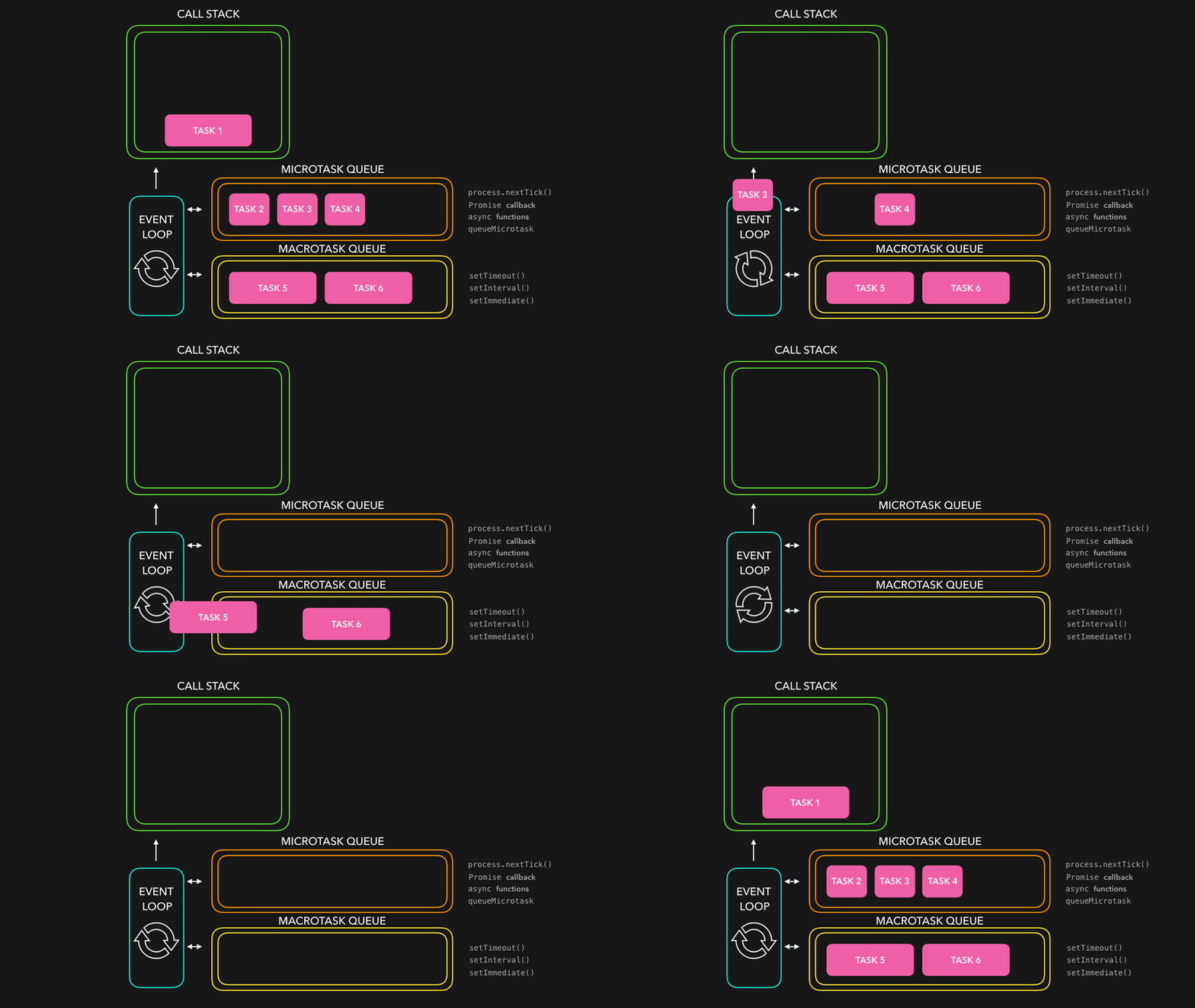
JavaScript has a concurrency model based on an event loop, which is responsible for executing the code, collecting and processing events, and executing queued sub-tasks.
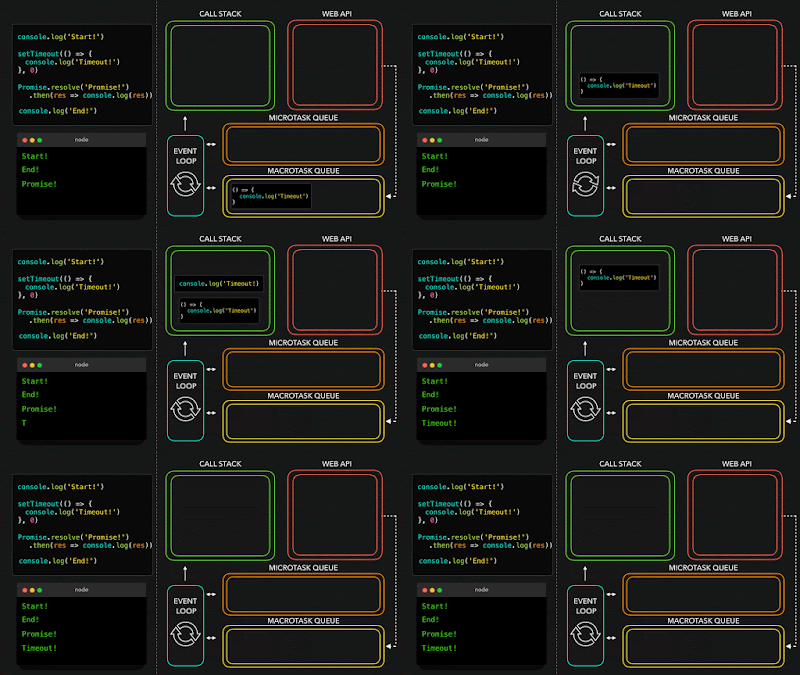


Callbacks vs Promises... vs Async

But also generators, observables and other reactive way of writing asynchronous code...

In brief, when it's possible: async , await

No more reason to bypass now:

Resources

... Final challenge solution

One solution can be found here : https://plnkr.co/edit/JTDgFGu1LaIq7HEO?preview


Hope it helps you to write better Javascript code ?!

2019/05/29

How I integrated Nuxeo Web Components into Angular, React and Vue.js


I like Angular Framework and happy to discover Web components as a great way to include features in it.


The idea here is to include these Nuxeo elements (polymer web components) in a basic Angular app offering search capabilities in a Nuxeo platform.

Other integrations have been successfully completed for React and Vue. Those one were quite easy and "natural" to do; see in React and Vue.js tutorials. So i'm curious to implement topics found in the web to enable js web components.


I finally did following these 7 steps :

1) using the Angular CLI to generate a new project.


$ ng new my-nuxeo-angular-app$ cd my-nuxeo-angular-app


2) Install components


$ npm install @nuxeo/nuxeo-elements @nuxeo/nuxeo-ui-elements


3) Because as many of web components are JS only, add JavaScript support to your app


tsconfig.json{  compilerOptions: {    "allowJs": true  }}


4) Enable custom elements schema


import { NgModule, CUSTOM_ELEMENTS_SCHEMA } from '@angular/core';...@NgModule({   …   schemas: [CUSTOM_ELEMENTS_SCHEMA],   …})


5) Verify that you can run the application


$ ng serve


Cool...


6) Then customize your app


Here the idea - as React and Vue integrations done - is to set a selection into a Nuxeo instance running on 8080 port.


And it works ! :)


and with some document list:

To give you feedback about major problems solved.


> A nuxeo-connection element needs to be out from any angular digest, so include it in you index.html is a way to connect to your Nuxeo instance.


> You would need to listen on some element events due to an common observer pattern. In this case, an angular child view can be useful:


page.html
<you-observed-component #observed />


component.ts
Class youObserverComponent {
  ...
 @ViewChild(observed) observed: ElementRef;
  // observed.addEventListner(‘your-event’,(e) => { …});

7) About API proxy or manage CORS


Angular gives you the opportunity to test in dev mode your local api through a local proxy; then Nuxeo:8080 could be mapped via


angular.json
"proxyConfig": "proxy.conf.json",


proxy.conf.json
{
 "/nuxeo": {
   "target": "http://localhost:8080/"
 }
}


The other way is to allow CORS in your API server, like described here https://doc.nuxeo.com/nxdoc/cross-origin-resource-sharing-cors/

Final conclusion and resources


Like explained at the begining, it was less natural to include web elements in angular than vue or react. The main reason is that angular is managing DOM in a more strict way and probably less open than other frameworks.
But again, after some optimization, the app looks cool and efficient ?!


Enjoy!

@mat

2019/05/08

How i feed content plateform with lotttts of documents


I‘ve worked with the Nuxeo content service platform for a few months and i need now to populate this platform within XX Million assets.

All systems i already work with handle this “problem” with a solution like ETL or Big Batch to use a mechanism like :
  1. Prepare all your data
  2. Unplug all your system engines (index, automation etc…)
  3. Inject your data (but be careful with all linked or nested data)
  4. Restart system and monitor e ach service as it starts (service after service)
  5. And then validate all the content here
I like the idea with Nuxeo that i could test another approach; because
  • I need to see and verify quickly
  • I need to define the approach wit a repeatable configuration - i can also easily share with team
  • I want to test my docker or whatever environment before production
Approach was to use Nuxeo SDK and indeed REST API, and finally using a realistic method that mirrors real life usage (even in a compressed time).

The challenge with this approach is that Nuxeo should ingest all those 60 Millions assets. I trust the Nuxeo Benchmarks with numbers like +-1000 docs / sec that means 60M/1000sec -> 24h, less than a week end ? … looks good to me, so let’s go!

First, Environments


A real Nuxeo environment is complex - for a good reason : performance !
But the idea is for my test to use the really easy to use “out of the box” nuxeo docker container.


 VS


Second, Ingest client

Two client utilities could do the job, using respectively nuxeo java and nuxeo js client (and behind nuxeo rest api):
  1. Nuxeo JHype, a spring / angularjs app that launch your scenario
  2. Nuxeo Tasks , a useful task launcher using gulp
I finally use the Nuxeo Tasks :

Screen01


But at the end, job done (> 660 docs / sec). Cool !


Context
REST Api
Parallel REST Api (spring batch, or node)
A) Simple Nuxeo Docker.
4 docs/sec
-
B) Nuxeo Docker with nuxeo-data:cached.
8 docs/sec
-
C) Full Nuxeo Docker Cluster.
16 docs/sec
33 docs/sec
D) Real AWS Nuxeo Cluster - after problems solving.
330 docs/sec
660 docs/sec đŸ˜„


Third, Problems

The real problems came in the real environments.

One problem you should take care is making sure that your client is well sized regarding your server. It means that you should scale the number of parallel HTTP connections regarding Nuxeo Connection Pool. Very simple to see and manage : look at the Nuxeo CPU. Nuxeo is under 70% for me with a client like 5 parallel ingestion tasks.

With that you can multiply by 2 your ingest capacity. Why not 5 ? Because we’ve got another bottleneck like database, and Nuxeo start using asynchronous treatments in Kafka. I want to finish the client job first, so that’s ok for me; Nuxeo will work for me during the night.

One other problem, is that feeding lots of data means some admin async process could struggle. It was the case for me on Nuxeo Orphan cleanup. Resolved by config (setting disabled like explained here).

The last one was linked to my Postgres DB and its config in Nuxeo - i know that something like MongoDB would be a better choice, but i need Postgres here -. Nuxeo Audit default config for Postgres is to be in database … and Nuxeo is auditing lots of things ! To resolve this problem you need to set Elasticsearch as audit repository.

See grafana's : 3 ingest waves linked to these 3 problems - but done.


Conclusion

In conclusion, i have been happy to see and test the awesome Nuxeo Platform.
I finally succeed with my goal and learn with those tests, and I know now that:
  • I can be confident on Nuxeo core (all my test leave the JVM without any fullgc)
  • I set here a small AWS EC2 set, but you can scale up in lots of different ways
  • You can go further but you need then to design all nodes beside (elasticsearch, database)... Nuxeo did a benchmark with Billions of assets ?! Or TeraOctet assets ?! Awesome, i have to say that to my wife :)

2018/11/21

How i discovered Nuxeo Docker Scaling


ECM is dead - Let me introduce you to this really good Content Service Platform: Nuxeo.

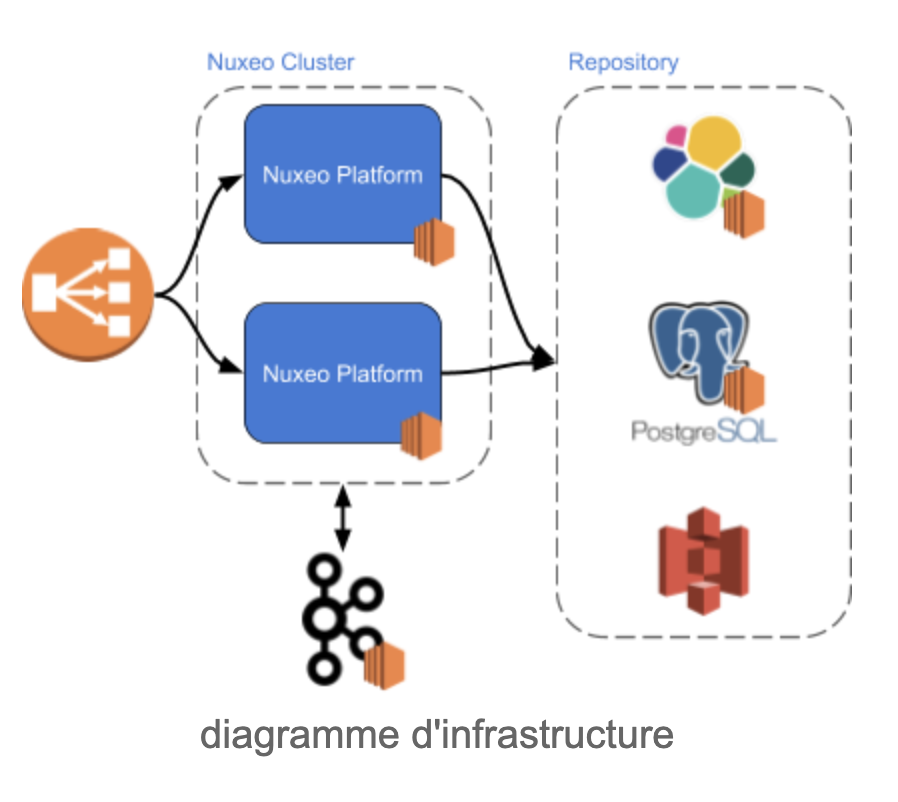
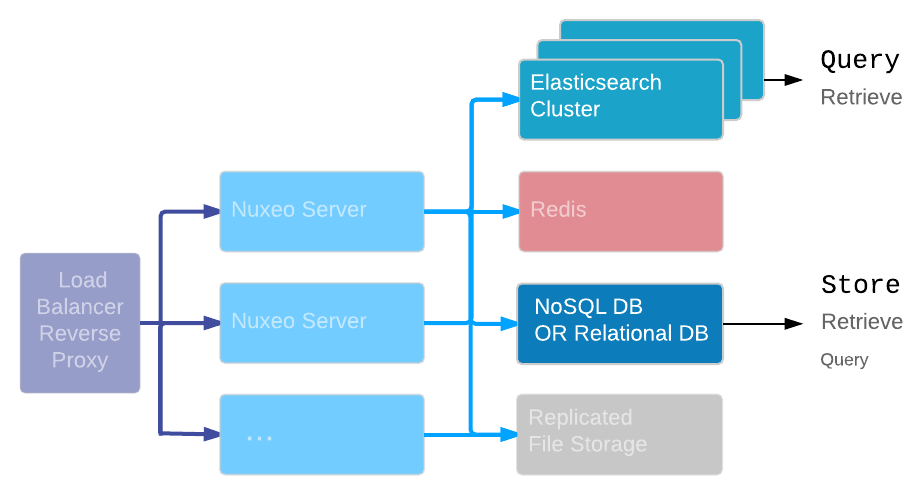
What i first noticed in Nuxeo Platform is its Cloud Ready architecture. It comes ready to use on AWS and it scales like described on the schema bellow.

To me, scalability means :

  1. no bottleneck
  2. modularity and extensibility

So far, i've experimented and checked :

1. DB agnostic and how simple it is to change from Postgres (SQL) to MongoDB (No SQL) for exemple. Brilliant ! My docker exemple is below with Mongo, but i also tested with Postgres and it really is as simple as edit a nuxeo.conf file. As DevOps, i can imagine it could should be a very useful pattern;
Modularity + 1

2. I started with the official Nuxeo Docker image. Then using docker-compose, i easily split my Nuxeo Project in one Nuxeo Server, one Elasticsearch and one Mongo. And later, it's possible to create an Elacticsearch node and clusterize Nuxeo Server too (as worker for asynchronous jobs) - again, a very useful pattern if you need to adjust your search or frontend performances; 
Modularity + 1

3. In general, performance and load distribution is difficult to test and measure. Nuxeo did their own benchmarks, but i wanted to make sure that nodes and specially the Nuxeo Server is ready to handle a huge web traffic. So i built a small Node js client based on nuxeo-js-client and tried to load test my Nuxeo Dockerized Platform (Nuxeo Server + Elastic + Mongo). I used Cadvisor as a monitoring tool. Here are the result I got:

Scenario 1, In one minute, more than 3 000 requests (read, update and create). CPU usage went up and fell down for all nodes similarly. Memory looks stable, no big peak. No real stress (10 ms request average).

windows (left to right) : Node js, Nuxeo, Elastic, Mongo.


Scenario 2, In two minutes, more than 12 000 requests (read, update and create), and then what i wanted to see: Memory following the speed-up ramp but CPU is staying moderate (compare to other scenarios) - other nodes receiving a continuous charge from Nuxeo Server Node. Is Nuxeo is dealing with memory to ramp up? yes, it allocates more memory to deal with the increase traffic, a good choice, specially in a Cloud context... but, most important here: 300 mixed reqs / sec - works like a charm! And Im pretty confident that it could handle more (regarding my config, docker, laptop etc...).

Notice : Nuxeo memory ramp-up, and what it looks like an Elasticsearch indexing in the middle - cool :)


Well done (30 ms request average) ! "No bottleneck" +1

I definitely need to go further, maybe in another post ? How and Elasticsearch is indexing all new contents ? Clustering ?...
But if you're interested in subject, the docs are here https://doc.nuxeo.com/nxdoc/nuxeo-cluster-scalability-options.

My Node Client, and Docker Gist, if you want to make your opinion :

Enjoy
@Mat